In the world of search engine optimization (SEO), your URL structure plays a pivotal role in how search engines crawl, index, and rank your content. Optimizing URLs isn’t just about keeping them short—it’s about making them meaningful, SEO friendly, and easy for both users and search engines to understand.
This guide dives into URL SEO optimization strategies that align with current best practices and Google's search results algorithms.
From using relevant keywords and lowercase letters to properly managing URL parameters, avoiding keyword stuffing, and crafting descriptive URLs, you'll learn how to build SEO friendly URLs that boost visibility.
Whether you're working with dynamic URLs, managing multiple pages, or planning a site move, mastering URL best practices is key to improving your organic traffic and overall SEO performance.
Let’s explore how a well-structured web address can turn your particular page into a standout result in Google Search.
What is URL SEO optimization and why is it important for organic traffic?

URL SEO optimization refers to the process of structuring and refining your web addresses to improve their visibility and ranking in search engine results. A well-optimized URL helps search engines understand what your content is about and makes it easier for users to navigate and share your links.
Why Is It Important?
URLs are one of the first things both users and search engines see. A descriptive URL not only gives a clear idea of the specific page content but also builds trust and improves click-through rates. For example, a URL example like:
yourwebsite.com/blog/url-seo-optimization-guide
is far more effective than a random string like:
yourwebsite.com/page?id=456
Key Benefits of URL SEO Optimization:
- Boosts Website’s SEO: Clean, relevant URLs that follow best practices help pages get indexed more effectively by search engines.
- Improves User Experience: A simple URL structure using canonical URLs prevents confusion and ensures that users and bots find the correct version of a page.
- Supports Site Scalability: With multiple pages and content updates, maintaining static URLs ensures consistency and avoids issues like broken links or duplicate content.
- Enhances Sharing & Visibility: Short, keyword-rich URL slugs display better in the browser’s address bar and social shares, increasing your content’s organic reach.
- Avoids Common SEO Mistakes: Long URLs, poorly structured paths, or too multiple URLs pointing to the same content can dilute ranking potential and confuse search engines.
In short, optimizing your URLs is a simple yet powerful way to increase your site’s visibility, ensure clarity for both users and crawlers, and drive sustained organic traffic over time.
How do SEO-friendly URLs improve a website’s visibility in Google search?
SEO-friendly URLs are essential for boosting a website’s visibility in Google search. These URLs are clean, readable, and strategically structured to align with search engine algorithms and user expectations. Here’s how they contribute to better performance:
1. Better Crawlability and Indexing
- Search engines like Google rely on clear URL paths to crawl and understand a web page. A well-structured, shorter URL helps search bots quickly interpret the content and index it correctly.
- This improves the chances of your page appearing in relevant search results, especially when the URL accurately describes the topic.
2. Higher Click-Through Rates (CTR)
A clean URL builds trust. Users are more likely to click on a link when the URL is readable and meaningful in the context of a Google search snippet. When Google sees a URL that looks trustworthy and includes relevant terms, it often displays that in the search snippet, contributing to higher CTRs.
3. Keyword Relevance
- Embedding relevant keywords in the URL (without keyword stuffing) enhances its SEO value. This helps Google associate the content of the page with the terms users are searching for. For example, a URL like:
- yourdomain.com/seo/url-optimization-tips
- clearly communicates the topic and is more likely to rank for related queries than a vague or overly complex URL.
4. Enhanced User Experience
- When a URL accurately describes what users will find on the page, it reduces bounce rates and improves engagement. SEO-friendly URLs are intuitive, making site navigation easier and more predictable.
- This benefits both users and the web server, as better-structured requests are handled more efficiently.
5. Easier Sharing and Linking
- Clean, shorter URLs are easier to share on social media, include in emails, or use as anchor text in blog posts and external links. The simpler the URL, the more likely people are to link back to it—boosting your page’s authority and SEO value.
- Keeping URLs up to date with current content trends also helps maintain long-term link equity.
SEO-friendly URLs help Google understand and rank your content, improve how users interact with your web page, and strengthen your website’s presence in organic search. Proper URL structuring is a small but powerful part of an effective SEO strategy.
How do you use hyphens to separate words in a URL?

Using hyphens correctly in a uniform resource locator (URL) is an essential part of creating clean, SEO-friendly web addresses that improve both visibility and user experience. Here's how to do it right:
1. Use Hyphens Instead of Underscores or Spaces
Search engines like Google treat hyphens as word separators, but underscores or spaces are not interpreted the same way. Always use hyphens (e.g., best-seo-tools) for maximum clarity and search engine understanding.
2. Replace Each Space With a Single Hyphen
When forming a vanity URL or customizing one using website builders, ensure every space between words becomes a single hyphen. For example, change example.com/seo tools guide to example.com/seo-tools-guide.
3. Use Only Lowercase Letters
URLs are case-sensitive in many user's browsers and on some web servers, especially for Linux-based systems. To avoid errors and broken links, use only lowercase letters in your URLs.
4. Avoid Multiple Hyphens in a Row
Multiple consecutive hyphens (e.g., seo---tips) look spammy and can confuse both users and search engines. Stick to one hyphen between each word for clarity and professionalism.
5. Don’t Use Hyphens at the Start or End
Leading or trailing hyphens in a URL can appear broken or untidy in the browser’s address bar. Always structure URLs so they begin and end with a word—not a symbol.
6. Keep URLs Short but Descriptive
A clean URL under your primary domain should communicate the topic of the page without unnecessary words. For example, use yourdomain.com/url-seo-basics instead of yourdomain.com/this-is-the-guide-for-learning-url-seo-basics.
7. Reflect Page Content Accurately
Make sure the URL accurately describes the content of the page it points to. This improves user trust, assists in indexing, and ensures your URL retains its SEO value even when shared independently from the page title.
Should you use lowercase letters or uppercase in SEO URLs?
When creating SEO-friendly URLs, lowercase letters are the recommended standard. Here’s why they matter and how using them affects your website’s performance in search engines:
1. URLs Are Case-Sensitive
While the top level domain and hypertext transfer protocol (like https://) are not case-sensitive, everything after the domain in a URL can be. For example:
- example.com/SEO-Tips
- example.com/seo-tips
These may be treated as two different URLs by your web server, leading to duplicate content issues and a drop in SEO value. Using only lowercase avoids this confusion.
2. Consistency Improves Crawl Efficiency
- Search engines favor simple URL structures with descriptive words that are consistent throughout the site. If your site uses a mix of uppercase letters and lowercase, it may cause indexing issues or slow down the crawling process.
- Lowercase URLs help maintain uniformity across all internal links and site architecture.
3. Lowercase URLs Are More Shareable and User-Friendly
From social media to email to typed entries in a user's browser, lowercase URLs are easier to read, share, and remember. Users are more likely to click on and trust URLs that are clean, readable, and predictable—boosting click-through rates and improving user experience.
Always use lowercase letters in your URLs. They’re cleaner, safer for SEO, and reduce the risk of broken links or duplicate content. Combine this with descriptive words and a clear structure for maximum SEO impact.
What’s the best way to create SEO-friendly URLs with targeted keywords?

Crafting SEO-friendly URLs is essential for improving your website's visibility in search engine results and making your content more accessible to users. Here’s how to do it right using targeted keywords:
1. Start With Your Primary Keyword
Place your most important keyword early in the URL. This tells search engines exactly what the page is about and improves ranking relevance.
Example: example.com/seo-friendly-urls
2. Keep the URL Short and Focused
Shorter URLs are easier for users to remember, share, and type. They also perform better in search engine results and avoid confusion in browser's address bars.
3. Use Hyphens to Separate Words
Use hyphens (-) to separate words, not underscores or spaces. This improves readability for both users and search engines, and follows standard SEO best practices.
4. Use Lowercase Letters Only
Lowercase URLs prevent errors and duplicate content issues since URLs are case-sensitive beyond the top-level domain. Stick to lowercase to ensure consistency.
5. Reflect the Page Content Clearly
The URL should accurately describe what the web page is about. A clear, descriptive URL improves click-through rates and builds trust with users.
6. Avoid Keyword Stuffing
Don’t cram multiple keywords into a single URL. Overuse can harm SEO and make the URL look spammy. Use only relevant keywords that flow naturally.
7. Make URLs Static, Not Dynamic
Use static URLs instead of dynamic URLs with random characters or URL parameters. Static URLs are more readable and more easily indexed by search engines.
How can you redirect a new URL properly to avoid duplicate content issues?
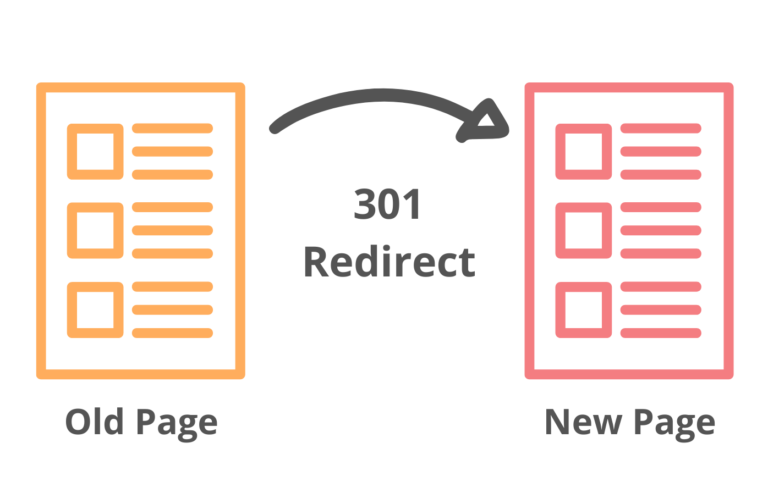
To properly redirect a new URL and avoid duplicate content issues in Google's search results, it's essential to implement SEO best practices that tell search engines how to treat the old and new URLs.
Duplicate content can negatively impact your rankings, split link equity, and confuse both users and search engines. Here's how to do it right:
1. Use 301 Redirects (Permanent Redirects)
A 301 redirect informs search engines that a web page has permanently moved to a new location. It passes about 90–99% of the original page’s SEO value (or "link juice") to the new URL.
- Why it matters: Google sees this as a permanent move and will eventually de-index the old page, avoiding duplicate content issues.
2. Redirect to the Most Relevant URL
Don’t just redirect all old pages to the homepage or a generic location. Redirect each specific page to the most relevant URL that matches its original content or purpose.
- Why it matters: Irrelevant redirects hurt user experience and may be flagged as soft 404s by Google.
3. Update Internal Links
After setting up the redirect, update all internal links on your website to point directly to the new URL instead of relying on redirects.
- Why it matters: Reduces load time, improves crawl efficiency, and avoids relying on redirects which can degrade SEO performance.
4. Avoid Chain Redirects and Loops
A redirect chain happens when page A redirects to B, which redirects to C. Redirect loops are worse—when URLs redirect in circles.
- Why it matters: Chains slow down crawling and reduce link equity. Loops can cause crawl errors and hurt your site’s visibility.
5. Set Canonical Tags Where Needed
If for some reason both the old and new URLs remain accessible, use the <link rel="canonical"> tag on the duplicate (usually older) page to indicate the preferred version.
- Why it matters: This helps search engines understand which page should appear in the search results, preventing duplication.
6. Submit Updated URLs in Google Search Console
Once your redirects are in place, go to Google Search Console and request indexing of the new URLs. Also, consider using the URL Inspection tool to ensure the redirect is correctly recognized.
- Why it matters: Speeds up the discovery and indexing of the updated pages.
7. Use a Sitemap with Updated URLs
Ensure your XML sitemap includes only the new URLs, and submit it through Google Search Console.
- Why it matters: Helps Google crawl and index the correct pages efficiently.
8. Monitor Redirects & Traffic
Use tools like Google Analytics, Search Console, and third-party crawlers (e.g., Screaming Frog) to monitor traffic shifts, errors, and crawl issues post-redirect.
- Why it matters: Allows you to catch issues like broken links, soft 404s, or redirect loops early.
Frequently Asked Questions(FAQs)

1. Should I include relevant keywords in my URL for better SEO?
Yes, using relevant keywords in your URL helps both users and search engines understand what the page is about. A clean, descriptive URL improves your chances of ranking higher in Google's search results by aligning the page content with the searcher’s intent.
2. What is keyword stuffing in URLs and how can it harm SEO?
Keyword stuffing is the excessive and unnatural use of keywords, including in your URLs. This practice can hurt your SEO by making your URLs look spammy, reducing click-through rates, and potentially triggering penalties in Google’s search results. Use keywords sparingly and logically.
3. What are the best practices for creating SEO-friendly URLs?
Some best practices include:
- Use relevant keywords close to the beginning.
- Avoid keyword stuffing.
- Use hyphens to separate words, not underscores.
- Keep URLs short and descriptive.
- Use lowercase letters only.
- Avoid unnecessary parameters or session IDs.
These techniques help search engines crawl your site and improve the user experience.
4. How do canonical URLs help with duplicate content across other pages?
Canonical URLs tell search engines which version of a page is the primary one when duplicate or similar content appears on other pages. This prevents duplicate content issues and consolidates ranking signals, improving SEO efficiency and helping your content perform better in Google's search results.
5. Should I create different URLs for other pages with similar content?
No, it’s better to avoid creating separate URLs for other pages if the content is mostly duplicated. Instead, use canonical URLs to point to the primary version or consolidate content into one well-optimized page using best practices.
6. How can I create SEO-friendly URLs that perform well in search engines?
To create SEO-friendly URLs, follow these tips:
- Include relevant keywords naturally.
- Avoid keyword stuffing or using too many keywords.
- Keep URLs short, readable, and descriptive.
- Use canonical tags if you have other pages with similar content.
- Follow general best practices for technical SEO.
7. Does changing URLs affect my website’s ranking?
Yes, changing URLs can impact your Google rankings if not handled properly. Without the right redirects, search engines might see the new URL as a completely different page, which can result in lost traffic and broken links.
8. How does URL structure impact Google's search results and organic reach?
A well-structured URL with relevant keywords helps Google understand your page content more easily. Clean URLs improve crawlability and user experience, both of which influence rankings. This can lead to better placement in Google’s search results and increased organic traffic.
Conclusion
Optimizing your URLs (Uniform Resource Locators) is a simple but powerful search engine optimization (SEO) strategy for boosting your website’s organic traffic, improving crawlability, and enhancing user experience.
By following URL best practices—such as using targeted keywords, hyphens, and lowercase letters, and avoiding duplicate content through proper redirects and canonical tags—you align your web structure with modern search engine algorithms.
Whether you’re launching a new site, managing dynamic pages, changing URLs, or refining existing links, following smart SEO principles ensures your pages are easy to find, easy to share, and easy to rank—giving your content the visibility it deserves in Google Search.

.jpg)
.jpg)
.jpg)
.jpg)
.jpg)
.jpg)
.jpg)
.jpg)
.jpg)
.jpg)
.jpg)
.jpg)
.jpg)
.jpg)
.jpg)
.jpg)
.jpg)
.jpg)
.jpg)
.jpg)
.jpg)
.jpg)
.jpg)
.jpg)
.jpg)

.png)
.png)
.png)
.png)
.png)
.png)
.jpg)
.jpg)
.svg)